How to Let Clients Update WordPress Content Without Breaking Layout
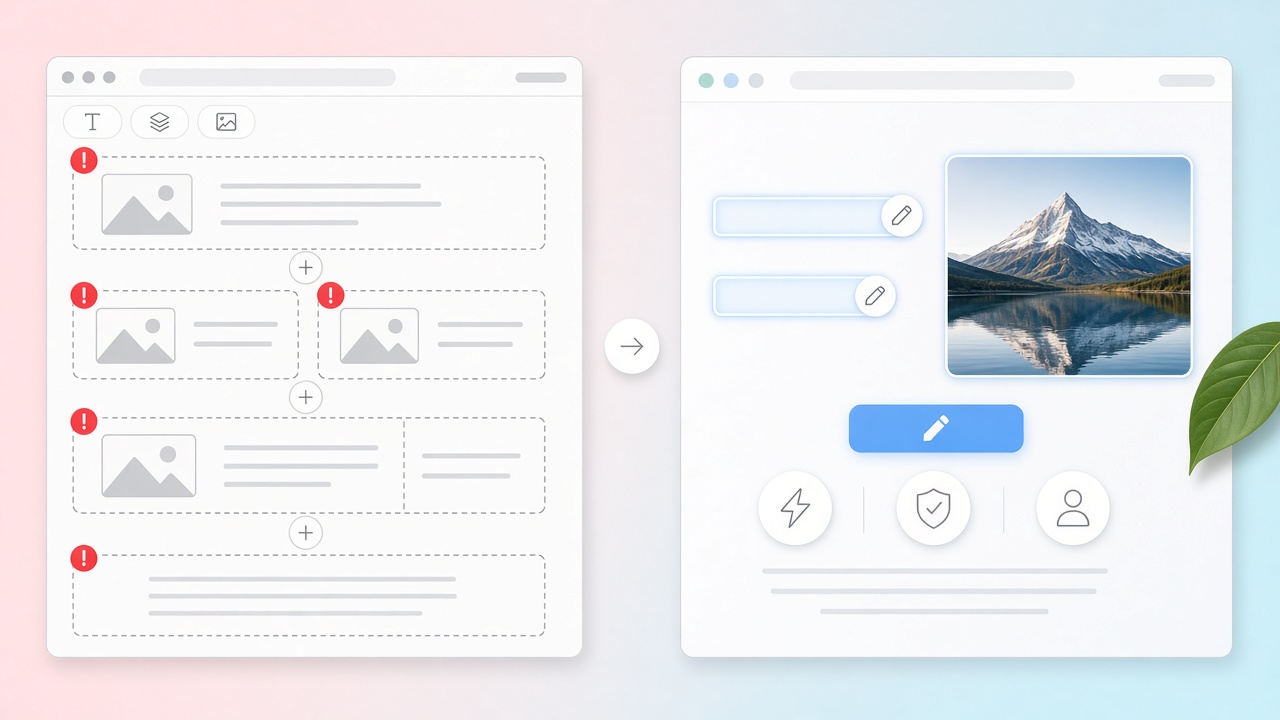
Short answer: Mark only the client-facing fields in your theme (headlines, photos, links) and leave every wrapper, grid, and stylesheet unmarked. With LiveCMS, developers wrap those fields in HTML comments. Clients click them on the live page and change the content, but they cannot add sections, move blocks, or edit CSS.
The ticket is almost always the same: change the headline, swap a photo, point the button at a new page. The client can do that — if the theme lets them touch content and not layout.
Most “let the client edit” setups do the opposite. Elementor, Divi, or Full Site Editing hands them a canvas. Block-role plugins lock Gutenberg in wp-admin. Neither matches a custom PHP theme that was designed to stay put.
This is the agency handoff for that site: clients update website content on the live page. Developers keep the grid.
What “breaking layout” actually means
Layout breaks when someone can add, move, or restyle structure:
- a new section or column
- a block they found in the inserter
- padding, font size, or a full-width toggle
- a page-builder widget that was never in the design file
Copy changes do not break layout. A new H1 in the same heading slot does not. A replaced image in the same wrapper does not.
If the client can only edit marked text, images, and links, the design in git stays the design on the live site. That is the contract. (We already argued the page-builder version of this in Clients Don't Need Page Builders.)
The usual options — and why they miss
Give them a page builder. Fast handoff. Then you maintain two designs: the one you shipped, and the one they assembled last Thursday.
Lock Gutenberg with Editor Access, Block Editor Roles, or Multigovernance. Useful if the site is blocks. It does not help a page-about.php hero that was never a block. WordPress's own version of this, contentOnly editing, has the same limit (more below).
Park copy in ACF and send them to wp-admin field names. Safer than Elementor. Still disconnected from the live page — and marketing copy in postmeta is a search problem of its own (ACF alternative for page copy).
Gutenberg front-end editors (FrontEdit, Frontpen, and similar). Fine when the page is already blocks. They do not mark regions in a handwritten PHP template.
None of these is “wrong.” They solve a different site.
Why not just use contentOnly locking or Block Bindings?
Use them if the site is built from blocks. They are native WordPress features and they do help. But both work on blocks inside the block editor, so neither one makes a hardcoded region in a PHP template editable on the live page.
contentOnly editing hides design tools inside a block pattern, template part or container, so editors change text and media but not structure. Since WordPress 7.0 it's the default for unsynced patterns and template parts. Two caveats for client handoffs. First, it's an editing mode, not a permission: a user can click "Edit pattern" on an unsynced pattern and get full editing. Second, the Block Locking docs note there's no UI to manage content locking; it's set in code.
Block Bindings connect block attributes, such as a Paragraph's content or an Image's URL, to sources like post meta. That's good plumbing for block templates. The client still edits in the block editor, and a custom theme's page-about.php has no blocks to bind.
So: block theme, use the native tools. Hand-built PHP theme, mark the regions.
The contract that works on custom themes
- Developer owns structure. Section order, CSS, which components exist.
- Client owns words, photos, and destinations. Headlines, body, images, button URLs.
- The plugin in the middle enforces that. No inserter. No drag-to-resize. Only marked regions.
On a LiveCMS theme that looks like HTML comments in the template:
<!-- lcms:text hero_heading -->
<h1><?php echo esc_html($hero_heading); ?></h1>
<!-- /lcms -->
The client clicks the heading on the live page, types, publishes. They never see a field group named homepage_hero_v3. Setup is in the developer quickstart; the longer product story is the inline content editor pillar.
A short handoff checklist
Before you give a client the keys:
- List the fields they may change (text, image, link). If it is not on the list, it is not editable.
- Walk one real edit on the staging URL — headline, photo, CTA — not a slide deck.
- Keep wp-admin for users, plugins, and media. Do not send them into the theme or a builder.
- Agree what happens when they need a new section. That is a developer ticket, not a client click.
Do that once and the “can you just…?” queue shrinks. You are not training them to be layout engineers.
Who this approach is not for
- Block-built sites. If the site uses a block theme or Full Site Editing, lock the block editor with contentOnly editing or use a Gutenberg front-end editor. LiveCMS marks regions in PHP templates.
- Clients who must create new pages or sections. Marked fields let clients change content, not structure. If they need to build layouts, they need a different tool.
- Teams with no handoff pain. If editors already work happily in wp-admin, keep it.
FAQ
How do I let clients edit WordPress without breaking the design? Only expose content: text, images, and links the developer marked. Do not give clients a page builder, the block inserter, or theme files. On a custom PHP theme, that means front-end regions in the template — not a second design tool.
Is locking Gutenberg enough? If the site is built from blocks, yes, mostly. WordPress's contentOnly editing and lock plugins keep editors to text and media, and contentOnly is the default for unsynced patterns since WordPress 7.0. It is an editing mode rather than a permission, so users can still reopen a pattern with "Edit pattern". On a classic or custom PHP theme, locking the block editor creates no editable template regions. You still need a content surface that matches the theme.
Can Block Bindings let clients edit a custom PHP theme? Not on their own. Block Bindings connect block attributes to data such as post meta, and editing still happens in the block editor. A PHP template that echoes its own markup has nothing to bind. Mark those regions in the template so clients can edit them on the live page.
Where should clients make the change? On the live (or staging) page they already see. Click the headline, change it, publish. Admin field UIs work for data records. They are a poor map for “the words in the hero.”
Get Started
If this is the handoff you want — clients update content, layout stays in the theme — Get Started on the homepage. The product demo shows the click-to-edit surface.
More context: how LiveCMS works and the rest of the blog.