Developer Quickstart: Implementing LiveCMS in 5 Minutes
To integrate LiveCMS into a WordPress theme, developers must include the core CSS and JS assets and then wrap editable template regions with specific HTML comments (e.g., <!-- lcms:text field_name -->). This markup-driven approach eliminates the need for Advanced Custom Fields (ACF) and allows for real-time frontend editing without touching the WordPress dashboard. It is designed to replace the heavy "edit-save-refresh" loop that currently slows down 90% of custom theme development.
For the agency-facing overview — the gap in block-centric frontend editors, what clients should and should not touch, and when to choose LiveCMS versus Gutenberg or ACF — start with Inline Content Editor for Developer-Built WordPress Themes.
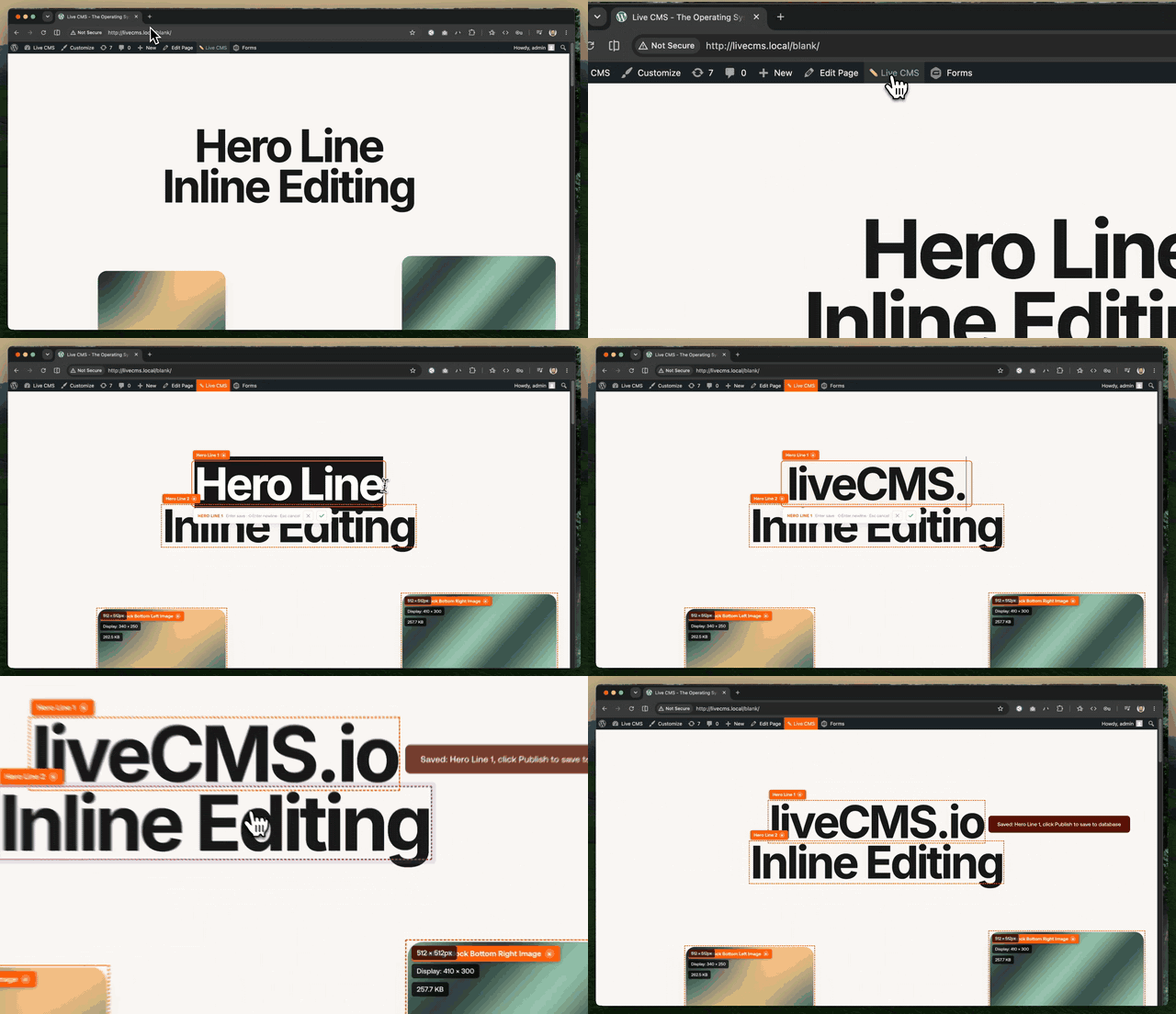
Overview
Template (PHP)                    LiveCMS Plugin (JS)
─────────────────                 ───────────────────
<!-- lcms:type name -->    →      Scanner finds comments
<element>content</element>  →      Injects data-lcms-* attributes
<!-- /lcms -->
- Developer adds HTML comments to mark editable areas
- The JS scanner runs on page load, finds comments, injects
data-lcms-*attributes on the next element - When an editor clicks, the appropriate modal opens
- On save, the REST API writes to a JSON file in the theme's
lcms-data/directory - On next page load, PHP reads the JSON and renders the content
Theme Requirements: wp_head() and wp_footer()
LiveCMS loads through two standard WordPress hook points. If a template skips them, the editor never loads and the admin bar (with the ✏️ LiveCMS toggle) never renders — even for logged-in admins.
wp_head()— inside<head>, just before</head>. Loads the admin bar styles and the plugin'slive-cms.js/live-cms.css(enqueued viawp_enqueue_scripts, which runs inside this hook).wp_footer()— just before</body>. WordPress prints the admin bar markup here.
Templates using get_header() / get_footer() already fire both — nothing to do. Self-contained templates (which skip get_header()/get_footer() to avoid doubling site chrome) must fire the hooks themselves:
<!doctype html>
<html <?php language_attributes(); ?>>
<head>
  <meta charset="<?php bloginfo('charset'); ?>">
  <meta name="viewport" content="width=device-width, initial-scale=1.0">
  <!-- your design CSS/JS -->
  <?php wp_head(); ?>
</head>
<body <?php body_class(); ?>>

  <!-- template markup with lcms comment markers -->

  <?php wp_footer(); ?>
</body>
</html>
The toggle additionally requires: logged in, a role with the edit_posts capability, and Users → Profile → "Show Toolbar when viewing site" enabled. Anonymous visitors never see the admin bar — that is normal WordPress behavior.
Agent Skill (AI coding assistants)
If you build templates with an AI coding agent (Claude Code, Codex CLI, Kiro, Gemini CLI, or any Agent-Skills-compatible tool), install the bundled skill so the agent marks up templates correctly — wrapping all editable areas with the right <!-- lcms:type field --> comments automatically.
Install (one-time):
# Kiro IDE
mkdir -p .kiro/skills
cp -r wp-content/plugins/live-cms/skills/live-cms .kiro/skills/

# Codex CLI / OpenCode / Cursor (cross-tool convention)
mkdir -p ~/.agents/skills
cp -r wp-content/plugins/live-cms/skills/live-cms ~/.agents/skills/

# Claude Code
mkdir -p ~/.claude/skills
cp -r wp-content/plugins/live-cms/skills/live-cms ~/.claude/skills/
Usage:
Once installed, ask in natural language:
- "Make this page editable with LiveCMS"
- "Add LiveCMS markers to this template"
- "Generate a LiveCMS page from this Figma frame"
Or use the slash command where supported: /live-cms
What the skill does:
The agent will automatically:
- Read your template and identify all editable content areas
- Wrap each area with the correct
<!-- lcms:type field_name -->comment markers - Generate a data-prep header block (
$d = lcms_data()+ per-field variables) - Create the matching
lcms-data/defaults/{template}.jsonfile with meaningful default values
It knows the field types (text, textarea, image, link, repeater, post), naming rules (snake_case, section-prefixed), and what NOT to wrap (nav, icons, backgrounds, footer).
See skills/live-cms/install/README.md for project-scope install and per-agent notes.
Comment Markup Reference
Every editable area is wrapped with an opening and closing comment:
<!-- lcms:{type} {field_name} -->
<element>content here</element>
<!-- /lcms -->
{type}— the field type (see table below){field_name}— unique name in snake_case, used as the JSON key
Field Types
text — Single-line text
<!-- lcms:text hero_heading -->
<h1>Your Heading Here</h1>
<!-- /lcms -->
Editor: Single-line input
JSON: "hero_heading": "Your Heading Here"
textarea — Multi-line text
<!-- lcms:textarea intro_body -->
<p>A longer paragraph of text that editors can change.</p>
<!-- /lcms -->
Editor: Multi-line textarea styled to match the element's font
JSON: "intro_body": "A longer paragraph..."
image — Image from Media Library
<!-- lcms:image hero_image -->
<div class="image-wrapper">
  <img src="<?php echo esc_url($hero_image); ?>" alt="" />
</div>
<!-- /lcms -->
Editor: Two tabs — Media Library browser + drag-and-drop upload
JSON: "hero_image": "/wp-content/uploads/2026/04/photo.jpg" (relative path)
link — Button or link (text + URL + target)
<!-- lcms:link cta_link -->
<a href="<?php echo esc_url($link_url); ?>">
  <?php echo esc_html($link_text); ?>
</a>
<!-- /lcms -->
Editor: Text input + URL input + "Open in new tab" checkbox
JSON: "cta_link": { "text": "Learn More", "url": "/about", "target": "" }
Supports: Full URLs, relative paths, anchors (#), mailto:, tel:
repeater — List of items (add/remove/reorder)
<!-- lcms:repeater team_members -->
<div class="grid">
  <?php foreach ($members as $m) : ?>
    <div class="card">...</div>
  <?php endforeach; ?>
</div>
<!-- /lcms -->
Editor: Modal with item list. Each item has: title, textarea, url, thumb (text label), image (Media Library) JSON:
"team_members": [
  { "title": "Jane", "thumb": "CEO", "textarea": "Bio text", "image": "/uploads/jane.jpg", "url": "" },
  { "title": "John", "thumb": "CTO", "textarea": "Bio text", "image": "/uploads/john.jpg", "url": "" }
]
post — Article/post picker
<!-- lcms:post kb_cards.0 -->
<div class="card">...</div>
<!-- /lcms -->
Editor: Search box + list of published posts. Click to select.
JSON: "kb_cards": [{ "post_id": 87 }, { "post_id": 0 }] (0 = auto-fill from latest)
wpblock — Gutenberg block (stored in DB, not JSON)
Generated automatically by the template loop — not manually written.
<!-- lcms:wpblock {index} {editor_type} {block_name} -->
<p>Paragraph content from Gutenberg</p>
<!-- /lcms -->
Editor: textarea for paragraphs, text input for headings, image editor for images
Saves to: wp_posts.post_content (WordPress database)
wpfield — WordPress post field (title, excerpt)
<!-- lcms:wpfield post_title text -->
<h1><?php echo get_the_title(); ?></h1>
<!-- /lcms -->
Editor: text input
Saves to: wp_posts table
wpauthor — Author picker
<!-- lcms:wpauthor post_author -->
<span><?php echo get_the_author(); ?></span>
<!-- /lcms -->
Editor: Dropdown of WordPress users
Saves to: wp_posts.post_author
wpdate — Date picker
<!-- lcms:wpdate post_date -->
<span><?php echo get_the_date('j F Y'); ?></span>
<!-- /lcms -->
Editor: Native HTML date picker
Saves to: wp_posts.post_date
PHP Helper Functions
Provided by includes/json-store.php:
// Get all content for current post/page
$data = lcms_get_content();
$data = lcms_get_content($post_id);

// Get a single field with default fallback
$heading = lcms_get('hero_heading', 'Default Value');
$heading = lcms_get('hero_heading', 'Default', $post_id);

// Get a repeater array
$items = lcms_get_repeater('team_members');

// Resolve image path to full URL
$url = lcms_image_url('/wp-content/uploads/photo.jpg');
// Returns: http://yoursite.local/wp-content/uploads/photo.jpg
// Empty string returns transparent SVG placeholder
JSON Data Storage
themes/{theme}/lcms-data/
├── content/                              # Per-page/post content
│   ├── page-about-us-259.json           # {type}-{slug}-{id}.json
│   ├── page-live-cms-demo-197.json
│   └── post-my-article-123.json
└── defaults/                             # Fallback values per template
    ├── page-about-us.json               # Matches template filename
    └── page-lcms-test.json
- Content files are created when an editor saves via LiveCMS
- If no content file exists, defaults are loaded based on the page template
- Files are managed by git (committed to the repo)
- Relative image paths make JSON portable across environments
REST API Endpoints
All require authentication (X-WP-Nonce header, edit_posts capability).
| Endpoint | Method | Body | Purpose |
|---|---|---|---|
/live-cms/v1/update-field |
POST | { field, post_id, value } |
Update text/textarea/link/repeater |
/live-cms/v1/upload-image |
POST | FormData: file, field, post_id |
Upload image + save path |
/live-cms/v1/update-post |
POST | { post_id, field, value } |
Update WP post field (title) |
/live-cms/v1/update-block |
POST | { post_id, block_index, value, block_type } |
Update Gutenberg block |
/live-cms/v1/update-block-image |
POST | FormData: file, post_id, block_index |
Replace block image |
/live-cms/v1/update-thumbnail |
POST | FormData: file, post_id |
Update featured image |
/live-cms/v1/update-author |
POST | { post_id, author_id } |
Change post author |
/live-cms/v1/update-date |
POST | { post_id, date } |
Change publish date |
/live-cms/v1/content/{post_id} |
GET | — | Read all JSON content |
/live-cms/v1/posts/search?q=term |
GET | — | Search posts (for post picker) |
/live-cms/v1/authors |
GET | — | List authors (for author picker) |
Template Examples
Basic page template
<?php
/**
 * Template Name: My Page
 */
get_header();
$page_id = get_the_ID();
$data = lcms_get_content($page_id);

$heading = isset($data['heading']) ? $data['heading'] : 'Default';
$body = isset($data['body']) ? $data['body'] : '';
$hero_img = lcms_image_url(isset($data['hero_image']) ? $data['hero_image'] : '');
?>

<!-- lcms:text heading -->
<h1><?php echo esc_html($heading); ?></h1>
<!-- /lcms -->

<!-- lcms:textarea body -->
<p><?php echo wp_kses_post($body); ?></p>
<!-- /lcms -->

<!-- lcms:image hero_image -->
<div><img src="<?php echo esc_url($hero_img); ?>" alt="" /></div>
<!-- /lcms -->

<!-- lcms:link cta -->
<?php $cta = isset($data['cta']) && is_array($data['cta']) ? $data['cta'] : []; ?>
<a href="<?php echo esc_url($cta['url'] ?? '#'); ?>">
  <?php echo esc_html($cta['text'] ?? 'Click Here'); ?>
</a>
<!-- /lcms -->

<!-- lcms:repeater features -->
<div>
  <?php foreach (lcms_get('features', []) as $f) : ?>
    <div>
      <h3><?php echo esc_html($f['title'] ?? ''); ?></h3>
      <p><?php echo wp_kses_post($f['textarea'] ?? ''); ?></p>
    </div>
  <?php endforeach; ?>
</div>
<!-- /lcms -->

<?php get_footer(); ?>
Single post template (with wpblock)
<?php
$blocks = parse_blocks(get_the_content(null, false));
$idx = 0;
foreach ($blocks as $block) {
    if (empty($block['blockName'])) continue;
    $rendered = render_block($block);
    $type = 'textarea';
    if ($block['blockName'] === 'core/heading') $type = 'text';
    if ($block['blockName'] === 'core/image') $type = 'wpimage';

    $editable = ['core/paragraph', 'core/heading', 'core/image'];
    if (in_array($block['blockName'], $editable, true)) {
        echo '<!-- lcms:wpblock ' . $idx . ' ' . $type . ' ' . esc_attr($block['blockName']) . ' -->';
        echo $rendered;
        echo '<!-- /lcms -->';
    } else {
        echo $rendered;
    }
    $idx++;
}
?>
AI / Figma MCP Integration
When using AI tools or Figma MCP to generate page templates:
- The AI/MCP generates the HTML/PHP with Tailwind styling as usual
- The developer (or AI with steering rules) adds
<!-- lcms:type name -->comments around editable content - A matching defaults JSON file is created at
lcms-data/defaults/{template-name}.json
Steering rule (.kiro/steering/lcms-page-generation.md) instructs the AI to:
- Wrap all content headings with
<!-- lcms:text --> - Wrap all body paragraphs with
<!-- lcms:textarea --> - Wrap all content images with
<!-- lcms:image --> - Wrap all CTA buttons/links with
<!-- lcms:link --> - Use snake_case field names derived from Figma layer names
- Never wrap navigation, icons, backgrounds, or structural elements
What to wrap:
- Page headings, body text, button labels →
textortextarea - Hero images, feature images →
image - CTA buttons, nav links with editable text →
link - Card grids, team lists, feature lists →
repeater - Article carousels →
post
What NOT to wrap:
- Navigation menus (managed by WP menus)
- SVG icons, decorative graphics
- Background patterns/textures
- Footer content (managed globally)
- CSS classes or layout wrappers
Plugin Files
plugins/live-cms/
├── live-cms.php              # Plugin bootstrap, REST API, admin bar
├── uninstall.php             # Cleanup on plugin deletion
├── readme.txt                # WordPress.org listing metadata
├── LICENSE                   # GPL-2.0-or-later
├── README.md                 # This file (developer docs)
├── includes/
│   ├── json-store.php        # lcms_get(), lcms_set(), lcms_image_url(), lcms_data()
│   ├── licensing.php         # Permission helpers (lcms_can_edit, lcms_can_upload)
│   └── analytics.php         # Opt-in activation stats (GA4 Measurement Protocol)
├── assets/
│   ├── live-cms.prod.js      # Editor (minified) — comment scanner, all modals
│   ├── live-cms.css          # Editor overlay styles
│   ├── lcms-logo.jpeg        # Plugin branding
│   └── marked.min.js         # Markdown renderer for in-admin docs
└── skills/
    └── live-cms/             # AI agent skill (copy to your agent's skills dir)
        ├── SKILL.md
        ├── install/README.md
        └── references/       # Detailed markup, helpers, and generation rules